Some bugs are hard because the problem is hard. Others are hard because you’re looking in the wrong place.
I had one of the second kind last week. A browser-based analytics dashboard I maintain worked fine on every desktop I tried. On my iPhone, it loaded to a near-black screen and never finished. Desktop Safari: fine. iPhone Safari: broken. Same application code, same browser engine family, same network.
The fix was one line, a single HTML <meta> tag. Getting to it took fourteen deploy-and-retest cycles across a couple of hours, each one convinced I’d identified the problem, each one wrong. The bug wasn’t subtle once I saw it. Almost every minute of the debug was wasted motion.
This post is about the six things I should have done differently to find the fix in one cycle instead of fourteen. The lessons generalize well beyond browsers — they’re about how to approach an opaque bug without burning your own time (and your users’) on hypotheses you haven’t earned.
The bug
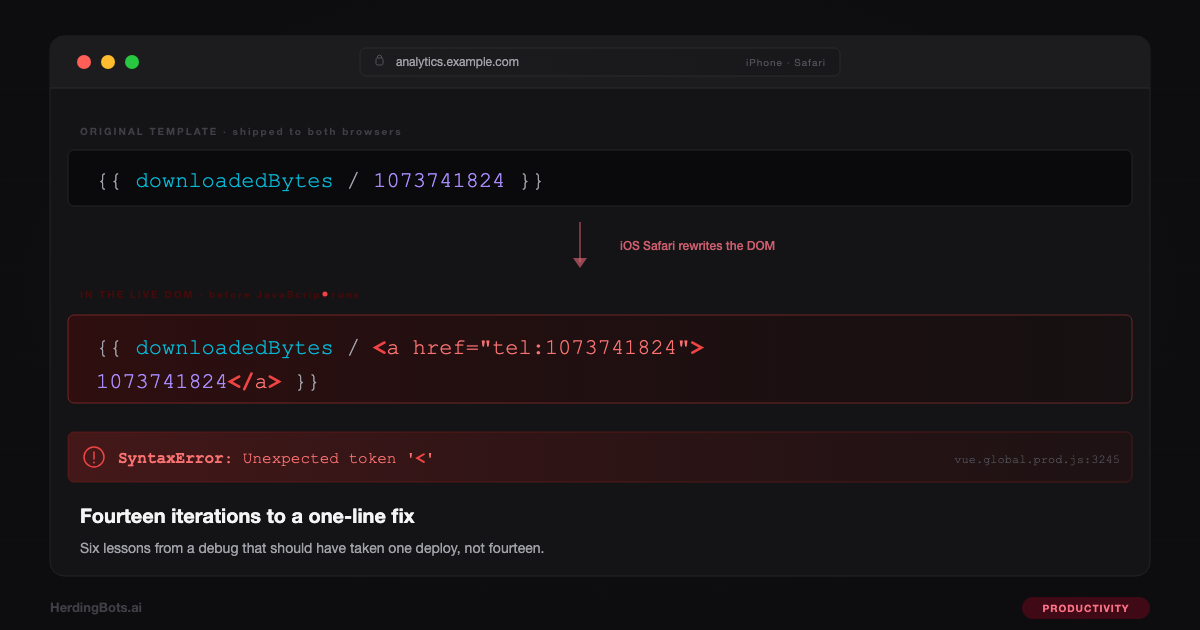
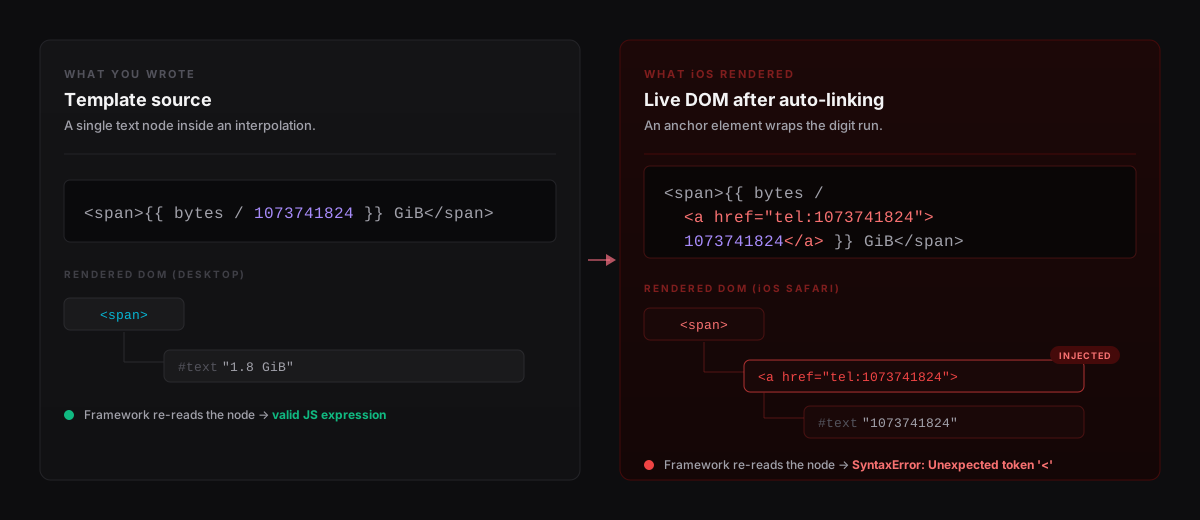
iOS Safari has a feature called “format detection” that’s on by default. When it encounters runs of digits that look like a phone number, it quietly wraps them in <a href="tel:..."> anchor tags in the live DOM — so a user tapping the number on their phone can place a call. This happens to the rendered HTML, before the page’s JavaScript gets a chance to run against it.
My dashboard had places that divided byte counts by 1073741824 (which is 1024³, the byte-to-gibibyte divisor) to display download sizes in GiB. The expression looked like this in the template:
{{ downloadedBytes / 1073741824 }}iOS Safari saw the 1073741824, decided it was a phone number, and rewrote that chunk of DOM to include an <a> tag with the digits inside it. When the frontend framework then tried to read that same chunk of DOM to treat it as a dynamic expression, it was no longer valid JavaScript — it was JavaScript with raw HTML anchor tags spliced into the middle of an arithmetic expression. The framework’s internal call to new Function(...) threw SyntaxError: Unexpected token '<', the whole app failed to start, and the user saw a spinner that never went away.
The fix is a single line in the page’s <head>:
<meta name="format-detection" content="telephone=no,date=no,address=no,email=no">That tells iOS to leave the document’s digit runs alone. Desktop Safari doesn’t do this detection, so this tag has no effect there. The application code was byte-identical across both browsers. I treated “iOS-only” as an incidental detail and went hunting through my own code. That was the first mistake.
Lesson 1: when the parser names a token, instrument the parser
The error said:
SyntaxError: Unexpected token '<' @ /static/vendor/vue.global.prod.js:3245I spent five iterations hunting for < characters in my template: was it the '<1' string literal in one mustache? The Poor <4 options in two <select> elements? Was it a Vue 3.5 regression versus 3.4? Every guess was wrong, and each one cost a deploy-and-retest round-trip with the user.
The column number wasn’t pointing at Vue’s source. When new Function(body) throws, Safari attributes the error to the URL of the caller, with a line number relative to the generated function body. The < was in code Vue had generated from my template — not in Vue itself.
The right first move, as soon as I saw “SyntaxError in new Function()”, was fifteen lines: patch Function and capture what it was parsing.
var OrigF = window.Function;
window.Function = function () {
  try { return OrigF.apply(this, arguments); }
  catch (e) {
    var body = String(arguments[arguments.length - 1]);
    var idx = body.indexOf('<');
    while (idx !== -1) {
      console.error('fn-has-<', idx, body.slice(Math.max(0, idx - 30), idx + 30));
      idx = body.indexOf('<', idx + 1);
    }
    throw e;
  }
};
window.Function.prototype = OrigF.prototype;
When I finally shipped this on iteration eleven, the first screenshot contained <a href="tel:1073741824"> right there in context. The bug was obvious in one look.
Rule: if the error is Unexpected token X in lib.js, the cause is almost never in lib.js — it’s in the input the lib is parsing. Instrument the parse call. This applies to new Function, JSON.parse, regex compilation, eval, every YAML/TOML loader.
Lesson 2: separate diagnostic deploys from fix deploys
My first deploy vendored 470KB of JavaScript libraries, tightened the Content Security Policy, and added a visible boot shell — all based on the guess that iOS content blockers were dropping scripts. The first diagnostic screenshot disproved that hypothesis in one frame: all scripts had loaded, all globals were defined. The vendoring work was already shipped.
Not all of it was wrong. The boot shell and format-detection tag both earned their place. But tightening the CSP and rewriting the script-loading path were solutions to a problem I hadn’t confirmed existed. That’s technical debt I added to “fix” a bug I hadn’t diagnosed.
Rule: diagnostic changes should only add observability. The moment you bundle “let me see what’s happening” with “let me fix what I think is happening,” you’ve committed to a hypothesis before you have evidence. When the hypothesis turns out to be wrong, the diagnostic data is still useful — but you’ve also shipped a refactor you didn’t need.
Lesson 3: ask for the diagnostic tool the user already has
The user had an iPhone and a Mac. That means they had Safari Web Inspector — Mac Safari’s Develop → iPhone → [page] menu, which gives you the full JS console on the iPhone with proper stack traces, source maps, and network timing. Five minutes of setup.
I never asked. Instead I cobbled together in-browser diagnostics across four iterations: first a generic error, then globals and loaded scripts, then a try/catch around mount(), then the Function patch. Four rounds to rebuild a capability Safari shipped in 2007.
Rule: when the user has devtools on the failing device, asking for one console screenshot beats inventing in-page diagnostics almost every time. “Plug your iPhone into your Mac, open Safari, enable Develop menu, pick your iPhone, send me the console output” is a one-minute ask that saves hours.
Lesson 4: cross-environment bugs are about environments, not code
The bug was iOS-Safari-only. That is not an incidental fact. Your code didn’t change between browsers; the environment did. So the first question is: what does the failing environment do that the working one doesn’t?
iOS Safari’s list of DOM-mutating behaviors I should have had mentally available:
- Automatic phone-number detection (this one)
- Automatic email and date detection
- Smart App Banner pre-processing
- Reader Mode pre-scan
- Intelligent Tracking Prevention (cookie and storage purges)
- Private Relay (proxied connections that can break IP-pinned sessions)
- Content blocker extensions (native, unlike desktop)
-webkit-text-size-adjustauto-zoom on orientation change
Any of these can break code written assuming a plain DOM. I burned four iterations on Vue version bumps and character hunts because I hadn’t enumerated this list before bisecting.
Rule: for any “works on X, fails on Y” bug, write down what Y does that X doesn’t before you start reading your own code. Environment differences are a short list; your code is a long one.
Lesson 5: don’t fight your own caching
After vendoring libraries at /static/vendor/vue.global.prod.js, I served them with Cache-Control: public, max-age=31536000, immutable. Then I tried to swap Vue 3.5 for Vue 3.4 without changing the filename. Safari held the cached copy for a year. The user saw “no change” across three deploys.
The SPA HTML had no cache-control header at all, which triggered Safari’s heuristic caching — roughly 10% of the time since last-modified. After my first deploy, the bug-laden HTML was heuristic-cached for hours. My fixes were live on the server and invisible to the iPhone.
Two mistakes, same shape: I cached aggressively without a plan for updating.
Rules:
- Immutable assets need versioned URLs.
vue.min.js?v=3.4.38orvue-3.4.38.min.js, not stable names. - HTML entry points should be
Cache-Control: no-store. They reference versioned assets that are already long-cached elsewhere, so re-fetching them is cheap. - Never leave cache-control unset. Heuristic caching is a landmine; explicit is better than implicit.
Lesson 6: calibrate your confidence
At various points I told the user:
- “Root cause was
'<1'as a string literal inside a Vue interpolation.” - “Vue 3.5.13’s JavaScriptCore rejected the compiled function where older engines tolerated it.”
- “This confirms Vue’s template compiler on iOS 26.”
All three were wrong. All three were stated as conclusions, not hypotheses. The user eventually wrote back: “THE PROBLEM IS EXACTLY AS BROKEN AS BEFORE. YOU HAVE DONE NOTHING TO FIX THE PROBLEM.” Fair.
Rule: when you’re guessing, say you’re guessing. “My best theory is X; if the symptom persists after deploy, I’ll check Y next” is calibration. “Root cause was X” without evidence is overclaiming — and when it turns out to be wrong, the user now has to re-establish trust in every subsequent claim.
The checklist I keep now
For any production bug, in order:
- Reproduce in a way that yields a stack trace. Remote devtools on real devices first; in-browser diagnostics only if that’s impossible. Ask, don’t invent.
- If the error names a vendor file, assume the cause is in the input, not the file. Instrument the parse site.
- For “works on X, fails on Y,” enumerate environment differences before reading code.
- Ship diagnostic changes and fix changes in separate deploys. Don’t bundle.
- Audit cache headers against your update plan. Every file you might want to change needs a cache-busting story.
- State hypotheses as hypotheses. Reserve “root cause” for things with evidence.
Fourteen iterations to one meta tag. The bug itself was subtle but well-known; getting to it was the work, and most of the work was avoidable.