I just published a post called Judgment is not a security boundary. The thesis was that a coding agent running under your user account has your user’s full filesystem privilege by default, and that “it’ll behave” is not a security posture. The recommended fix was an OS-level sandbox enabled in ~/.claude/settings.json, applied at user scope so every Claude Code session starts locked down.
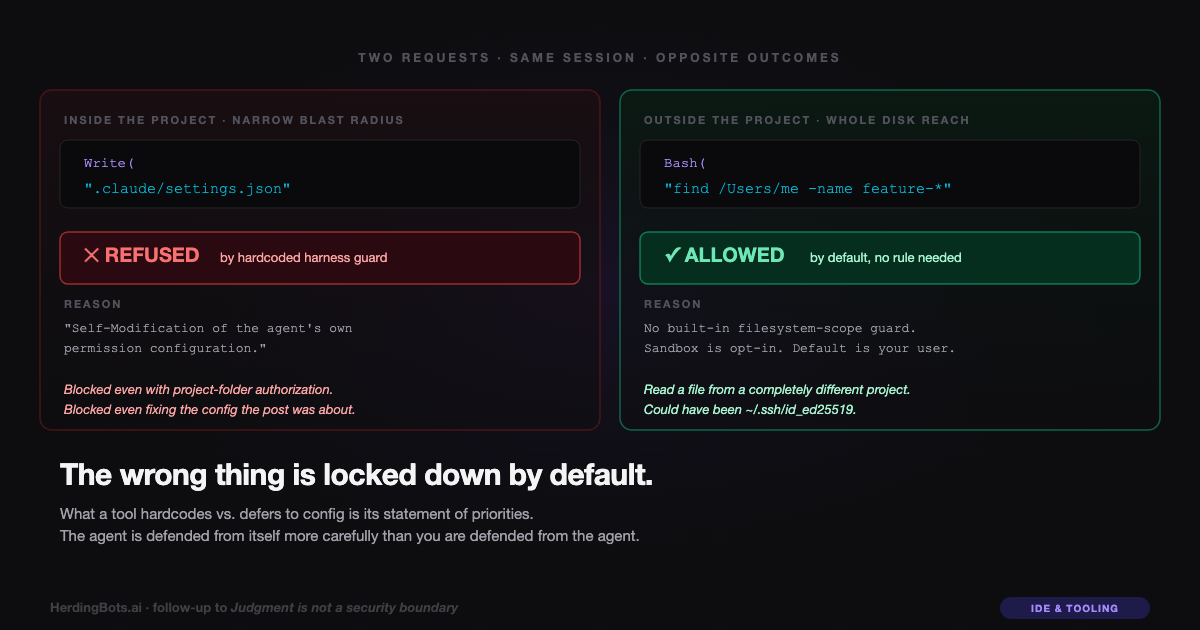
Then I went to have the agent apply that fix to the project-level .claude/settings.json, and the harness refused. The reason it gave was self-modification of the agent’s own permission configuration. The agent isn’t allowed to edit the file that governs its own permissions, even with my blanket authorization over the project folder, because an agent rewriting its own allow list is the textbook privilege-escalation move under prompt injection.
That refusal is good. It’s the harness doing its job.
It’s also the rest of the story — the part I missed in the first post.
One refusal, two requests
Within the span of this same session, I made two requests that crossed a boundary:
-
The day before, I asked the agent to check whether a file existed. It ran
find /Users/me -name "feature-roadmap*", which walked up out of the project directory and into a sibling project on the disk, and then read twenty lines of a file in that sibling project to answer me. No refusal. This is the incident the first post was about. -
Today, I asked the agent to fix its own settings file — the exact file, inside this project folder, the previous post was telling readers to edit. Refused. With a crisp, specific reason about self-modification.
One of those requests was inside the project folder, narrow in blast radius, and targeted the agent’s own config. The other was outside the project folder entirely, leaked someone else’s private notes, and targeted a file that had nothing to do with this session’s work.
The harness blocked the narrow one and allowed the broad one.
Why — and why that’s not an oversight
A charitable read is that the harness’s designers made a defensible call. Self-modification is universally bad. It’s easy to fingerprint — “this tool call targets the settings file that configures tool calls” — and easy to guard at the harness level without knowing anything about the user, the project, or the threat model. So it got hardcoded.
Filesystem scope, meanwhile, varies by context. Some users legitimately want an agent that can sed across every project in their home directory. Others (me) want the agent sandboxed tight to one project. There’s no single correct default, so the harness ships with the permissive default and a configuration hook (sandbox.enabled, permissions.deny, et al.) for users who want to tighten it.
That’s the rationale. It’s internally consistent.
It’s also backwards.
The priority inversion
An adversarial agent — prompt-injected, compromised, or just confused — has two obvious things to try:
-
Step one: read things it shouldn’t. SSH keys,
.envfiles, shell history, browser cookies, the other projects on the disk. This is the cheap, immediate, high-value move. Every asset is a first-class target. Most attacks stop here because there’s nothing left to steal worth the effort of going further. -
Step two: rewrite its own constraints to do more. This is slower, requires multi-step reasoning, and only matters if step one’s output wasn’t enough. A sophisticated attack. An unsophisticated attack skips it entirely and exfiltrates what it already has access to.
Claude Code ships with a hardcoded guard against step two and no hardcoded guard against step one. The thing a hostile agent would do first and most cheaply is allowed by default. The thing a hostile agent would do second, if at all, is blocked unconditionally.
Put another way: the harness protects the agent’s integrity better than it protects your data. The agent is defended from itself more carefully than you are defended from the agent.
What a tool locks down is a statement of priorities
There’s a general principle buried here, and it applies beyond Claude Code.
Any developer tool that touches your machine has to make two kinds of security choices: what to hardcode as always-on, and what to defer to per-user configuration. The first category is “we think this is always wrong, and we’ll enforce it even if the user didn’t think to ask.” The second category is “this depends on context; the user fills it in or lives with the defaults.”
Read the first category carefully. It’s the vendor’s threat model, made concrete.
If the hardcoded guards are about preserving the agent’s behavioral integrity (can’t self-modify, can’t run commands during startup, can’t spawn unregistered subprocesses), the vendor is prioritizing the tool’s reliability and their own reputation. That’s a product-centric threat model.
If the hardcoded guards are about preserving your data (can’t read outside working directory, can’t transmit without consent, can’t touch credential stores), the vendor is prioritizing your blast radius. That’s a user-centric threat model.
You can tell the two apart by looking at what happens on first launch, before you’ve configured anything. Claude Code, today, launches with an agent that can’t rewrite its own permissions but can read every file your user account can read. That default is a product-centric posture. Not nefarious — just prioritized toward preventing the agent from embarrassing itself, rather than preventing you from being embarrassed by the agent.
What “default secure” would actually look like
The inversion is fixable, and the fix is roughly what the previous post recommended but applied one level up — at the tool default, not the user config.
A default-secure coding agent’s permissions, on first launch, would look something like:
-
Filesystem scope defaults to the working directory. Reads, writes, globs, greps. Sandbox-enforced at the OS level, not judgment-enforced. Want broader access? Add an allow rule. Want narrower? It’s already as tight as you can get without reconfiguring.
-
Network defaults to none. Outbound HTTP/HTTPS blocked unless the user adds a
WebFetchor equivalent allow rule. No surprise exfiltration paths pre-granted. -
Credentials directories defaulted-denied at multiple layers.
~/.ssh,~/.aws,~/.config/gcloud,~/.npmrc,~/.git-credentials, the system keychain, browser profile dirs — all in the deny list out of the box, even if the working-directory sandbox somehow fails. Defense in depth against the obvious target list. -
Self-modification guard stays on. The current one is good and should remain hardcoded. It’s just not the only thing that should be.
With those on by default, users opt-in to broader access (which is a visible, auditable act) rather than opt-in to narrower access (which most users never do because they don’t know they should). The difference between those two default modes is which class of user ends up getting hurt — the one who forgot to configure safety, or the one who forgot to configure capability. The former costs you credentials. The latter costs you a config prompt.
The post-post-mortem
My original post ended on “judgment is not a security boundary.” That’s still the thesis I’d lead with. But the follow-up lesson — the one this session taught me by accident — is sharper:
The absence of a guard is itself a guard.
When a tool ships with hardcoded guard X but not guard Y, it is making a durable claim that Y is your problem to solve. Most users don’t solve it. The ones who do write blog posts about it after almost getting burned.
The asymmetry between the self-modification guard and the nothing-at-all-guarding-your-filesystem has a specific effect: it makes the failure mode it permits look like a user error rather than a design error. “You should have enabled the sandbox.” “You should have known about additionalDirectories.” “You should have reviewed your .claude/settings.json.” All of which is true, and all of which also describes a default that is reliably producing the same user error across the entire install base. When a design reliably produces the same user error, it is the design that is wrong, not the user.
The right floor for a coding agent installed on a developer machine is can only see the project it’s in, by default, at the kernel level. Today, that floor is opt-in. Until it isn’t, the asymmetry — the wrong thing locked down — is worth naming every time it comes up, because naming it is how defaults eventually move.
What I did about it
After this session, I set the sandbox config from the previous post at user scope. Every new Claude Code session on this machine now starts with sandbox.enabled: true and a deny floor covering everything under my home directory, with an explicit allow for the current project and ~/.claude. The deny rules can’t be weakened from a project-level .claude/settings.json because user scope sits above project scope in precedence, and deny always wins over allow.
I also rotated the credentials that had been on disk during the pre-sandbox window. SSH keys, API keys, GitHub PATs, anything I’d have been furious to see in the wrong hands. Assume-breach is the only sensible posture after an unsandboxed session, even if no specific leak occurred.
And the project-level .claude/settings.json in this repo? Trimmed to only the minimum allow rules the deploy script needs. No more stale permissions from ad-hoc sessions past. The settings file is now readable as a declaration of what this project’s agent is allowed to do, not a junk drawer of every prompt I’ve ever approved.
But the most useful thing I did was notice that the harness had the floor in the wrong place.
That’s the whole lesson of this post. The previous one was about how your coding agent has your credentials. This one is about how the tool that lets it have your credentials is not going to tell you — it ships with guards around the things it considers important, and you have to compare that list to the things you consider important, and fill in the gap yourself.
Until that gap closes in the tool’s defaults, every developer running a coding agent on a machine with real credentials is one find command away from the incident I wrote about yesterday.
Judgment is not a security boundary. Neither is the absence of a vendor’s concern. If the default is wrong, the fix is not to trust that the default got most of the important cases — it’s to look at what did get hardcoded, read it as a priority statement, and decide whether those priorities are yours.
Usually, they aren’t. That’s the job.