Most of what I want from an AI coding harness isn’t “make the model smarter.” It’s “make the boring things happen on their own.” Format after every write. Stop the session if I try to touch a secrets file. Beep when a long task finishes. Dump a log I can grep later.
Claude Code’s hooks system does all of that, and it has been the single biggest quality-of-life upgrade to my workflow since I started using the tool. But it’s also the feature most people skim past in the docs, because it looks like a configuration surface instead of a capability. It is a capability. The hooks are shell commands that the harness runs on your behalf at very specific lifecycle moments — and that gives you a surprising amount of mechanical control over what “using Claude Code” actually means on your machine.
This is the cookbook I wish I’d had when I started. What hooks are, when they fire, how to configure them, and six recipes I run in production.
What hooks actually are
A hook is a shell command that Claude Code runs at a specific lifecycle event. The key word there is “Claude Code runs” — not the model. The harness (the CLI or VS Code extension process that wraps the model) is what invokes hooks. The model itself never sees them, never decides whether to run them, and can’t override them.
That distinction matters. Anything you can express as a deterministic, synchronous shell command can be a hook, and it will execute every time the event fires, regardless of what the model is doing or thinking. If you want “format every file after every write,” you don’t ask Claude nicely in your prompt. You write a hook. The harness runs prettier --write after the Write tool completes, and the model doesn’t even have the option to skip it.
Hooks receive a JSON payload on stdin describing the event (session id, tool name, tool inputs, and so on) and communicate back via exit code and stderr. Exit code 0 means “all good, continue.” Non-zero exit codes can block the tool call from proceeding or surface messages to the session, depending on the event.
That’s the whole model. A small, deterministic layer of shell between the model and your filesystem.
The hook lifecycle
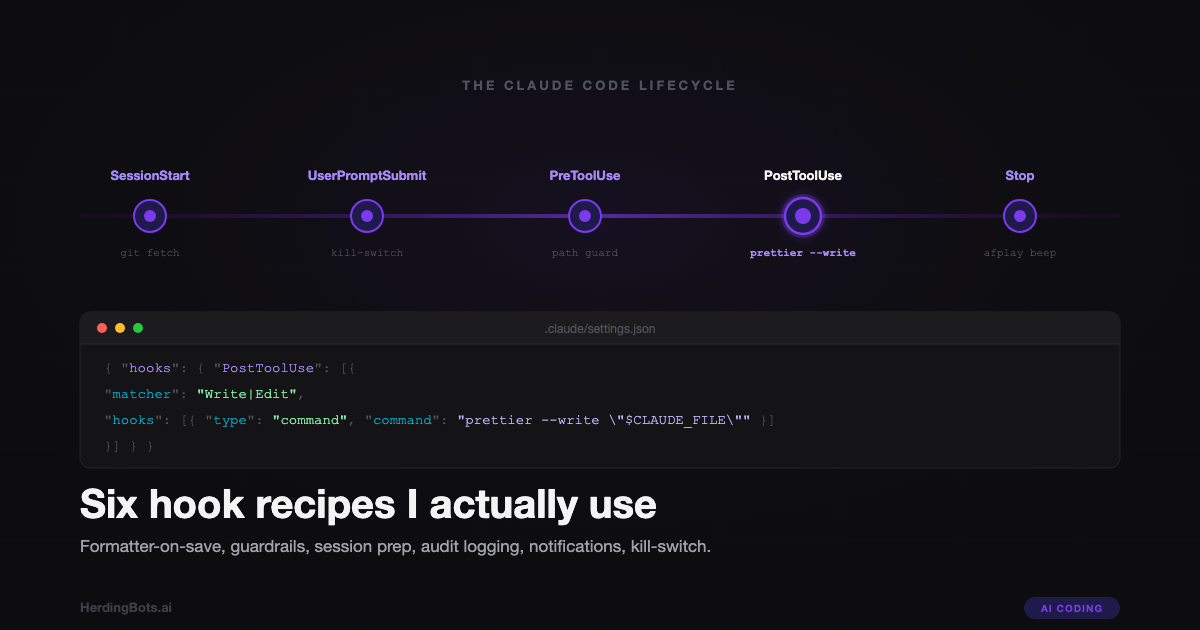
There are more events than you’d expect, but these are the ones that cover 95% of real-world use:
| Event | When it fires | Common uses |
|---|---|---|
SessionStart | Every new session or resumed session | git fetch, warm caches, stamp a start time |
UserPromptSubmit | Before the prompt is sent to the model | kill-switches, prompt rewriting, logging |
PreToolUse | Before a tool call executes | guardrails, allowlists, confirmation gates |
PostToolUse | After a tool call completes | formatting, linting, audit logging |
Stop | When the model’s response ends | notifications, timers, artifact dumps |
SubagentStop | When a spawned subagent finishes | same as Stop, but for task-scoped agents |
There are a handful of others — PreCompact, PostCompact, notification hooks — but the six above are the ones I actually write. Everything in the recipes section maps to one of them.
Two structural details are worth naming up front, because they trip people up:
Tool hooks use a matcher. PreToolUse and PostToolUse fire for specific tools, so their configuration includes a matcher field that pattern-matches the tool name (Write, Edit, Bash, and so on). A matcher of "Write|Edit" means the hook fires for both. A matcher of ".*" or "" means all tools.
Lifecycle hooks don’t use a matcher. SessionStart, UserPromptSubmit, Stop, and SubagentStop aren’t tied to a specific tool, so they omit matcher entirely. If you copy-paste a tool-hook shape and try to use it for Stop, the hook will silently fail to fire. I’ve written a whole separate guide on this exact trap — see the audio-alert Stop hook guide for the full story.
Where to configure them
Hooks live in settings.json. There are three layers, in priority order from most-to-least specific:
| File | Scope | Committed to git? |
|---|---|---|
.claude/settings.local.json | Per-project, per-machine | No — gitignore it |
.claude/settings.json | Per-project, shared with the team | Yes |
~/.claude/settings.json | Global, all projects on this machine | n/a (user-level) |
Hooks merge across all three. If your global settings fire a sound on Stop and your project adds a notification hook too, both run. There’s no override — only accumulation.
That accumulation is what makes the trust model important. A hook in a checked-in .claude/settings.json runs on every teammate’s machine when they clone the repo, the first time Claude Code opens it. That’s convenient for shared guardrails (every developer auto-formats the same way) and terrifying for anything more exotic. I’ll come back to the security implications in a dedicated section below. For now, the rule is: shared repo hooks should do obvious, boring, inspectable things. Anything personal or environment-specific goes in .claude/settings.local.json (gitignored) or ~/.claude/settings.json.
For a deeper read on the layered settings model and how it interacts with VS Code’s own config, I wrote a full walkthrough in Configuring settings.local.json for VS Code + Claude Code.
The hook config shape
Here’s the general shape of a hooks block in settings.json:
{
  "hooks": {
    "PostToolUse": [
      {
        "matcher": "Write|Edit",
        "hooks": [
          { "type": "command", "command": "prettier --write \"$CLAUDE_TOOL_FILE_PATH\"" }
        ]
      }
    ],
    "Stop": [
      {
        "hooks": [
          { "type": "command", "command": "afplay /System/Library/Sounds/Glass.aiff 2>/dev/null || true" }
        ]
      }
    ]
  }
}
A few things to notice. Each event is an array, so you can register multiple independent hook groups per event. Each group has a hooks array of command entries (in practice I almost always have one command per group, but the nesting is there if you need it). Tool-hook groups have a matcher; lifecycle-hook groups don’t.
Commands get the JSON event payload on stdin, and Claude Code also exposes a small set of environment variables — $CLAUDE_TOOL_NAME, $CLAUDE_TOOL_FILE_PATH for file-oriented tools, and a few others depending on the event. You can also just read stdin with jq if you want the full payload.
That’s the whole config surface. Let’s put it to work.
Six recipes I actually use
a. Format on every write
The most obvious win. Any time Claude writes or edits a file, run the right formatter for it. No more “I told you the project uses Prettier, why did you emit un-formatted code.” The model’s output doesn’t matter — the harness fixes it before you see it.
{
  "hooks": {
    "PostToolUse": [
      {
        "matcher": "Write|Edit",
        "hooks": [
          {
            "type": "command",
            "command": "f=\"$CLAUDE_TOOL_FILE_PATH\"; case \"$f\" in *.ts|*.tsx|*.js|*.jsx|*.json|*.md|*.mdx|*.css) prettier --write \"$f\" 2>/dev/null || true ;; *.go) gofmt -w \"$f\" 2>/dev/null || true ;; *.py) ruff format \"$f\" 2>/dev/null || true ;; esac"
          }
        ]
      }
    ]
  }
}
Three things to note. The case dispatches on file extension so one hook handles a polyglot repo. The 2>/dev/null || true at the end of each branch is deliberate: a formatter failure should not block Claude’s tool call. If Prettier can’t parse the file (because the edit was mid-flight invalid), I’d rather see the broken file and fix it than have the whole Edit return an error.
If I’m working in a repo with an ESLint-plus-Prettier setup that expects both to run in sequence, the command becomes prettier --write "$f" && eslint --fix "$f", still wrapped in || true.
b. Guard rails on sensitive paths
PreToolUse can block tool calls entirely by exiting non-zero. I use this as a safety net against the one mistake that’s expensive to undo: Claude touching a secrets file or a production config that was supposed to be read-only.
{
  "hooks": {
    "PreToolUse": [
      {
        "matcher": "Write|Edit",
        "hooks": [
          {
            "type": "command",
            "command": "f=\"$CLAUDE_TOOL_FILE_PATH\"; case \"$f\" in *.env|*.env.*|*/secrets/*|*/.aws/*|*/production.yml) echo \"BLOCKED: $f is protected\" >&2; exit 2 ;; esac"
          }
        ]
      }
    ]
  }
}
Exit code 2 is the “block this tool call and surface the message” convention for PreToolUse — the tool never runs, and the stderr text gets surfaced back into the session so the model knows why. Claude can then adjust (often by asking me which file I actually wanted it to touch), rather than silently failing.
I treat this as a belt-and-suspenders layer, not my primary defense. The primary defense is not giving Claude write access to those paths in the first place, and keeping secrets out of the repo. But the hook catches the cases where a model decides to “helpfully” add something to .env.local it shouldn’t, and I want that caught at the harness layer, not in a code review three commits later.
c. Session prep
SessionStart fires once per session. The obvious use: make sure the repo is in a sane state before Claude does anything.
{
  "hooks": {
    "SessionStart": [
      {
        "hooks": [
          {
            "type": "command",
            "command": "cd \"$CLAUDE_PROJECT_DIR\" && git fetch --quiet origin && git status --short"
          }
        ]
      }
    ]
  }
}
Two effects. First, git fetch runs before the first prompt, so any “what’s the latest on main” question has accurate data. Second, git status --short prints into the session, giving Claude immediate context on dirty files. I’ve found this dramatically reduces the “Claude suggests work that duplicates my uncommitted changes” failure mode.
For longer-lived projects I’ll sometimes add a npm outdated or git log -n 5 --oneline to the same hook. The principle is: anything I would reflexively type into the terminal before starting work, the hook can do for me.
d. Audit log
PostToolUse with an unconstrained matcher gives you a write hook on every single tool call Claude makes. Pipe that to a JSON lines file and you have a perfect audit trail.
{
  "hooks": {
    "PostToolUse": [
      {
        "hooks": [
          {
            "type": "command",
            "command": "jq -c --arg ts \"$(date -u +%FT%TZ)\" '{ts: $ts, tool: .tool_name, input: .tool_input, ok: (.tool_response.error == null)}' >> \"$HOME/.claude/audit.jsonl\""
          }
        ]
      }
    ]
  }
}
Every tool call gets one line: timestamp, tool name, input payload, whether it succeeded. jq -c produces compact JSON, so each tool call is exactly one line in the file. I can tail it in another terminal while Claude runs (tail -f ~/.claude/audit.jsonl | jq) or grep it after the fact to answer “what did Claude actually do during that session.”
This is probably my favorite hook. It’s passive, it costs nothing, and it makes the agent auditable in a way the normal transcript doesn’t. If something weird happens, I have a structured record.
e. Notification
The Stop hook is the notification hook. I don’t repeat the full breakdown here because I wrote a whole guide on it — One Line to Rule Them All: Adding an Audio Alert When Claude Code Finishes — but the minimal version is this:
{
  "hooks": {
    "Stop": [
      {
        "hooks": [
          {
            "type": "command",
            "command": "afplay /System/Library/Sounds/Glass.aiff 2>/dev/null || true"
          }
        ]
      }
    ]
  }
}
On macOS this plays a short chime every time Claude finishes a response. On Linux, substitute paplay or aplay and any short .wav. On Windows under WSL I’ve seen people use powershell.exe -c [console]::beep(...).
The notification-at-end pattern is the smallest useful hook in the whole system and it’s the one I’d install first on any new machine.
f. Kill-switch
UserPromptSubmit fires before your prompt reaches the model, and it can short-circuit the whole thing with exit code 2. I use this as an “emergency stop” pattern for long autonomous sessions: if I type a specific keyword, the harness cancels the prompt before Claude sees it.
{
  "hooks": {
    "UserPromptSubmit": [
      {
        "hooks": [
          {
            "type": "command",
            "command": "p=$(jq -r '.prompt'); case \"$p\" in *EMERGENCY\\ STOP*|*ABORT\\ ABORT*) echo \"Kill-switch triggered.\" >&2; exit 2 ;; esac"
          }
        ]
      }
    ]
  }
}
This is most useful in a context where Claude is running in a long loop and I want to pull it out without killing the whole terminal. Typing EMERGENCY STOP as a prompt aborts the turn cleanly, the session state remains intact, and I can then send a real next message. It’s not strictly necessary — Ctrl+C works — but the hook version leaves better session hygiene, and once you’ve got one kill-word configured you find more uses for the pattern (rate-limiting prompts, rewriting them, logging them).
Debugging hooks
Hooks fail silently by default, which is the single most annoying thing about them. A typo in your command, a missing binary on $PATH, a bad quoting character — all of it produces zero visible output and a confused “why isn’t this firing?” experience.
The debugging toolkit is small but effective:
Run Claude Code with claude --debug. This dumps every hook invocation, its stdin, its exit code, and its stderr to the terminal. Most hook problems show up immediately once you can see the actual output.
Tee stderr to a log file. Inside the hook command, add 2>>/tmp/hook.log (not instead of 2>/dev/null — as well as, at the end). Then tail -f /tmp/hook.log in another terminal while you work. This is my go-to for diagnosing hooks that sometimes work and sometimes don’t.
Pipe-test the command in isolation. Before writing anything to settings.json, run the command end-to-end in a real shell, with a fake JSON payload piped to stdin:
echo '{"tool_name":"Write","tool_input":{"file_path":"/tmp/test.ts"}}' | <your command>
echo "exit: $?"
If it doesn’t work there, it won’t work as a hook. If it does work there and still doesn’t fire as a hook, the problem is in the config structure, not the command.
Three gotchas I’ve hit more than once:
- Non-zero exit codes from formatters blocking tool calls. Always wrap in
|| trueforPostToolUsehooks unless you specifically want a non-zero exit to be surfaced. - Quoting. JSON-in-shell-in-JSON is a three-layer escaping problem. Single quotes inside double quotes inside JSON strings require careful backslash discipline. When in doubt, write the command as a standalone script in
~/.claude/hooks/something.shand reference that script from the hook — one layer of quoting is much easier to reason about than three. $PATH. The hook runs in whatever environment the harness gives it, which may not have your shell’s full$PATH. Ifprettierworks in your terminal and not in the hook, it’s probably a PATH issue — use the absolute path (/opt/homebrew/bin/prettier) or source your shell profile inside the hook.
Security considerations
Here’s the part that deserves real attention. A hook in .claude/settings.json — the committed, team-shared file — runs on every teammate’s machine the first time they open the project in Claude Code. That’s arbitrary shell execution on every collaborator’s box, triggered by a git pull.
For the boring uses (Prettier, ESLint, a git fetch) that’s fine. For anything else it is a supply-chain risk the same shape as a malicious package.json postinstall script. Treat committed hooks with the same skepticism.
The practical rules I follow:
- Committed hooks do obvious, boring, inspectable things only. Auto-format, run a linter, print git status. Things any teammate can read and verify in ten seconds.
- Anything with side effects on the user’s machine goes in
.claude/settings.local.json(gitignored) or~/.claude/settings.json. Audio notifications, audit logs writing to$HOME, per-machine paths, anything environment-specific. - Never copy a hook config from a repo you don’t trust without reading every command first. “I’ll just clone this and try it” is how you run someone else’s code with your shell privileges.
This connects to a broader point I’ve made elsewhere: judgment is not a security boundary. Relying on “well, I’d notice if a hook did something weird” is the same failure mode as relying on “well, Claude wouldn’t run that dangerous command.” The security boundary needs to be structural — the hooks you trust are the ones you can mechanically verify are safe, not the ones that feel safe. Read every command. If you can’t read shell fluently enough to verify it, either learn or don’t run the hook.
What I don’t use hooks for
Hooks are powerful, which makes it tempting to reach for them when they’re the wrong tool. A few things they are specifically bad at:
Flow control that belongs in the prompt. “Claude should ask before making large changes” is a prompting problem, not a hooks problem. Hooks don’t have judgment; they have conditionals. If the decision requires reasoning, the decision belongs to the model.
Anything that needs Claude’s reasoning. Hooks are shell commands. They can’t look at diff context and decide whether it looks reasonable. They can only match patterns. If you find yourself wanting to write a hook that “checks if the change makes sense,” you want a prompt, or a subagent, or a code review.
Async retries, long-running watchers, or anything with state that outlives a session. Hooks are synchronous shell commands that run to completion and then stop. If you want a filesystem watcher or a scheduler, use a filesystem watcher or a scheduler. The hook can kick one off, but the hook itself should return immediately.
Anything that assumes a specific UI. Hooks run the same whether you’re in the CLI or the VS Code extension. If you write a hook that assumes you can pop a notification in VS Code specifically, it’ll break when you use Claude Code in a terminal.
The rule of thumb is: hooks are for deterministic, fast, shell-level automation that you want to happen unconditionally at a specific moment. Everything else belongs somewhere else — the prompt, the project’s CLAUDE.md, a subagent definition, a separate tool.
Once you have that distinction clear, hooks stop being a mystery configuration surface and start being what they actually are: a small, reliable automation layer that takes the most annoying mechanical parts of your workflow off your desk. Six recipes is enough to feel the difference. Start with format-on-write and notification-on-stop. Add the audit log next. The rest will suggest themselves as you notice which boring things you’re still doing by hand.